History for "Send a Message to Your Users & Members"
-
Updated by Alex Neil, Jan 29, 2025 at 1:03pm
Send a Message to Your Users & Members -
Updated by Alex Neil, Jan 29, 2025 at 1:03pm
When you need to message your users and members, Proximity makes it easy to send a note to individual members as well as all members of a membership type.
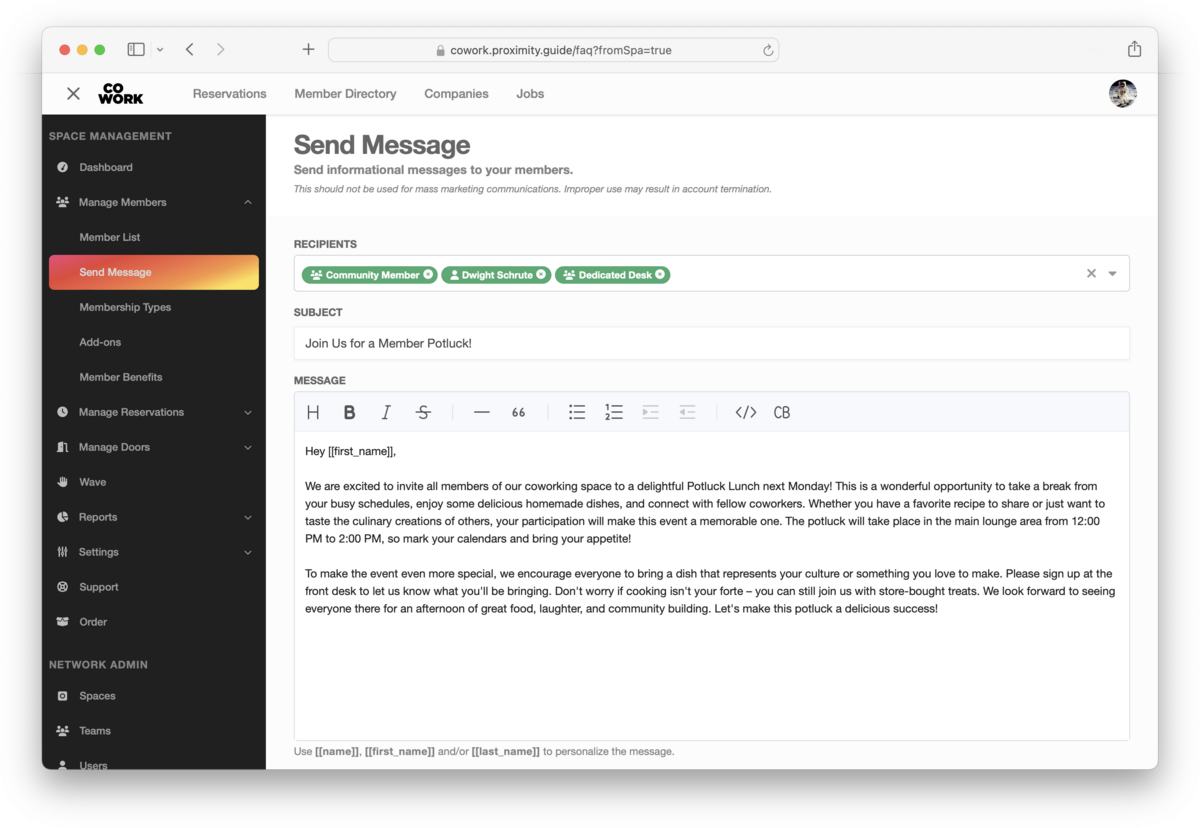
Sending a Message
- From your dashboard, navigate to Manage Members > Send Message
- Add recipients, these can be individual members and/or membership types
- Add a subject
- Add your message
- Send
You can only send messages to members of your space. Non-member email addresses cannot be added.
A Warning About Abuse & Spam
Community emails are sent from the same address used to send member notifications regarding invoices, reservations and other actions taken in the platform. It is important to only send relevant information to your members to avoid spam complaints which will affect the delivery of future messages. Using the tool for mass marketing is against the ToS and may result in deactivation of the feature or account.
Requirements
You must have a custom verified sending address configured in order to send member emails.
FAQ
Who is included in the various email send groups? All non-deleted members, regardless of status.
-
Updated by Alex Neil, Jul 02, 2024 at 11:16am
When you need to message your members, Proximity makes it easy to send a note to individual members as well as all members of a membership type.
Sending a Message
- From your dashboard, navigate to Manage Members > Send Message
- Add recipients, these can be individual members and/or membership types
- Add a subject
- Add your message
- Send
You can only send messages to members of your space. Non-member email addresses cannot be added.
A Warning About Abuse & Spam
Community emails are sent from the same address used to send member notifications regarding invoices, reservations and other actions taken in the platform. It is important to only send relevant information to your members to avoid spam complaints which will affect the delivery of future messages. Using the tool for mass marketing is against the ToS and may result in deactivation of the feature or account.
Requirements
You must have a custom verified sending address configured in order to send member emails.
FAQ
Who is included in the various email send groups? All non-deleted members, regardless of status.
-
Updated by Josh Hudnall, Jun 03, 2024 at 10:32am
When you need to message your members, Proximity makes it easy to send a note to individual members as well as all members of a membership type.
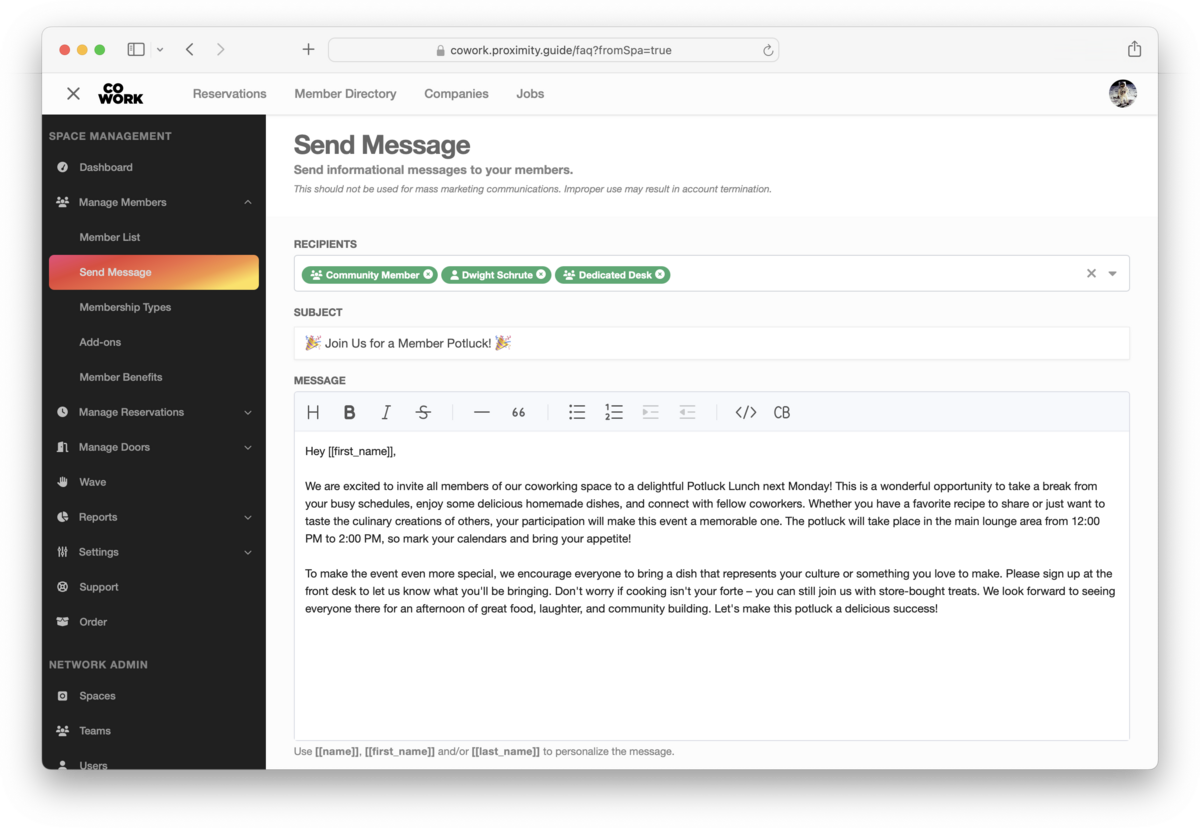
Sending a Message
- From your dashboard, navigate to Manage Members > Send Message
- Add recipients, these can be individual members and/or membership types
- Add a subject
- Add your message
- Send
You can only send messages to members of your space. Non-member email addresses cannot be added.
A Warning About Abuse & Spam
Community emails are sent from the same address used to send member notifications regarding invoices, reservations and other actions taken in the platform. It is important to only send relevant information to your members to avoid spam complaints which will affect the delivery of future messages. Using the tool for mass marketing is against the ToS and may result in deactivation of the feature or account.
Requirements
You must have a custom verified sending address configured in order to send member emails.
-
Updated by Josh Hudnall, Jun 03, 2024 at 10:20am
When you need to message your members, Proximity makes it easy to send a note to individual members as well as all members of a membership type.
Sending a Message
- From your dashboard, navigate to Manage Members > Send Message
- Add recipients, these can be individual members and/or membership types
- Add a subject
- Add your message
- Send
You can only send messages to members of your space. Non-member email addresses cannot be added.
A Warning About Abuse & Spam
Community emails are sent from the same address used to send member notifications regarding invoices, reservations and other actions taken in the platform. It is important to only send relevant information to your members to avoid spam complaints which will affect the delivery of future messages. Using the tool for mass marketing is against the ToS and may result in deactivation of the feature or account.
Requirements
You must have a custom verified sending address configured in order to send member emails.
-
Updated by Josh Hudnall, Jun 02, 2024 at 11:04pm
When you need to message your members,
[[platform_name]]Proximity makes it easy to send a note to individual members as well as all members of a membership type.Sending a Message
- From your dashboard, navigate to Manage Members > Send Message
- Add recipients, these can be individual members and/or membership types
- Add a subject
- Add your message
- Send
You can only send messages to members of your space. Non-member email addresses cannot be added.
A Warning About Abuse & Spam
Community emails are sent from the same address used to send member notifications regarding invoices, reservations and other actions taken in the platform. It is important to only send relevant information to your members to avoid spam complaints which will affect the delivery of future messages. Using the tool for mass marketing is against the ToS and may result in deactivation of the feature or account.
-
Created by Josh Hudnall, Jun 02, 2024 at 11:03pm